
Your cloud architect — before launch, and every day after.

Anneal reads your code and your company’s rules, measures what your app really needs, picks services from live price lists and deploys them. Then it keeps watching — when traffic, prices or your code change, it updates the architecture with you.

Not a one-time report. A live architecture for AWS, Azure, Google Cloud and Oracle Cloud.

Designs and prices on

AWS Azure Google Cloud Oracle Cloud Terraform
Built around your company

It learns your rules before it designs anything.

Most tools design for a blank page. Anneal starts from the way your company already works — and treats your policies as requirements, not suggestions.

  • Reads your policies and governanceSecurity, compliance and architecture documents — PDF, Word, Markdown — with every rule cited back to its page and line.
  • Knows the regulations that applySOC 2, HIPAA, PCI DSS, GDPR, ISO 27001 and data residency — worked out from the data your code really handles.
  • Respects what you already runExisting Terraform, pipelines, cloud accounts and past architectures are built on, not ignored.
  • Keeps your standardsApproved regions, must-use and never-use services, tagging, naming and budget ceilings hold in every design.
  • Asks only what it can’t readTraffic, availability, recovery targets — asked once, with a recommendation, and remembered for the project.
  • Flags conflicts earlyWhen the code breaks a policy you hear it before the design, with the closest compliant option.
Design and deploy

From first look to first deploy, with proof.

Ask in plain words. Anneal tests and measures your app, chooses and prices every service, draws and reviews the design, writes the infrastructure and deploys it — and you watch every step.

Every box on the diagram has a reason.

Services are chosen from the cloud's own catalog for the workload Anneal measured, drawn with the official icons and numbered in the order requests flow. Each one carries its price and the decision behind it.

A Flask spam classifier on Azure: 5 services, 5 flows — Container Apps at 2–6 replicas, behind an Application Gateway, with the model in Blob Storage.
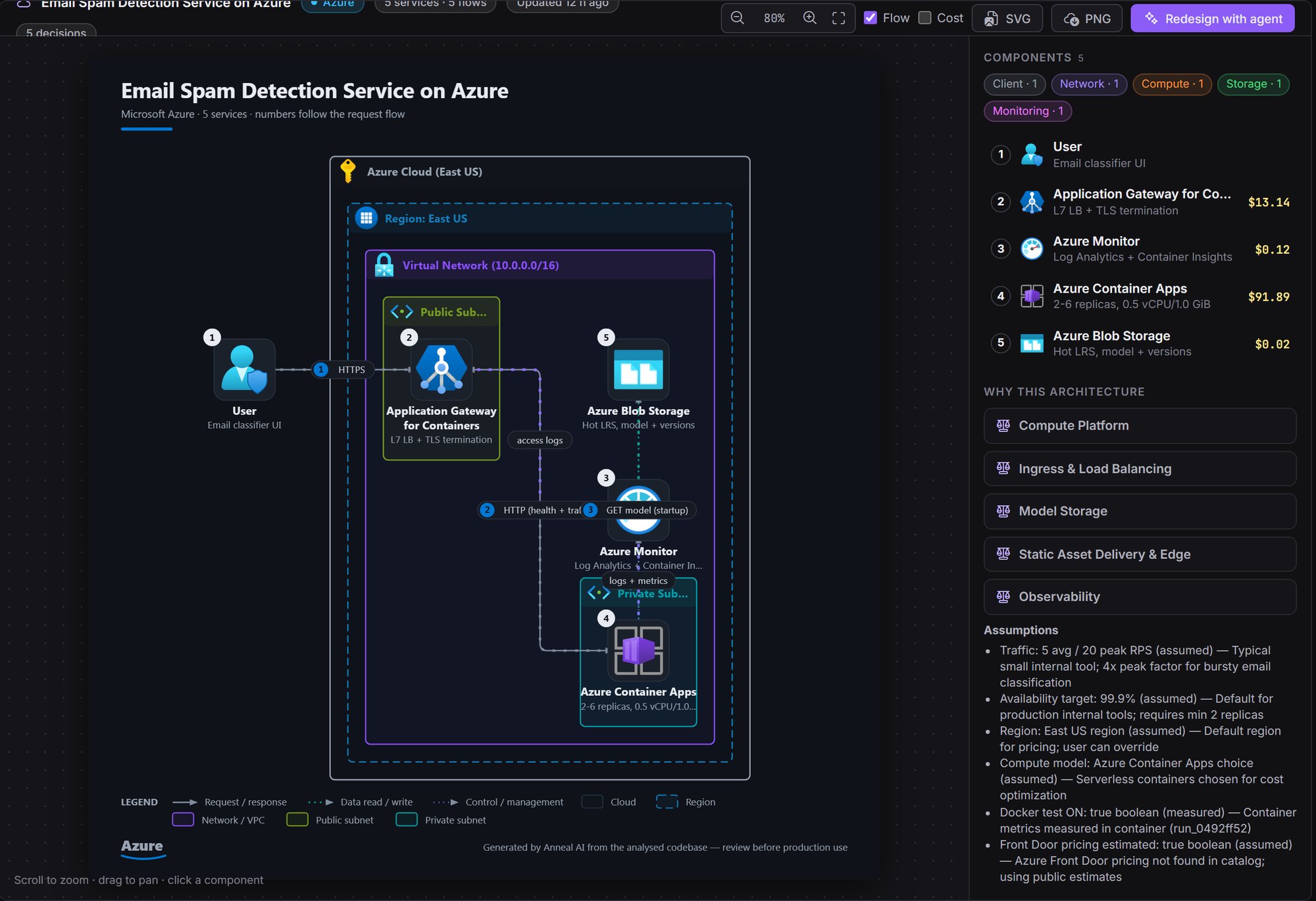
Anneal architecture page: Azure diagram for an email spam detection service

Prices you can trace to the line.

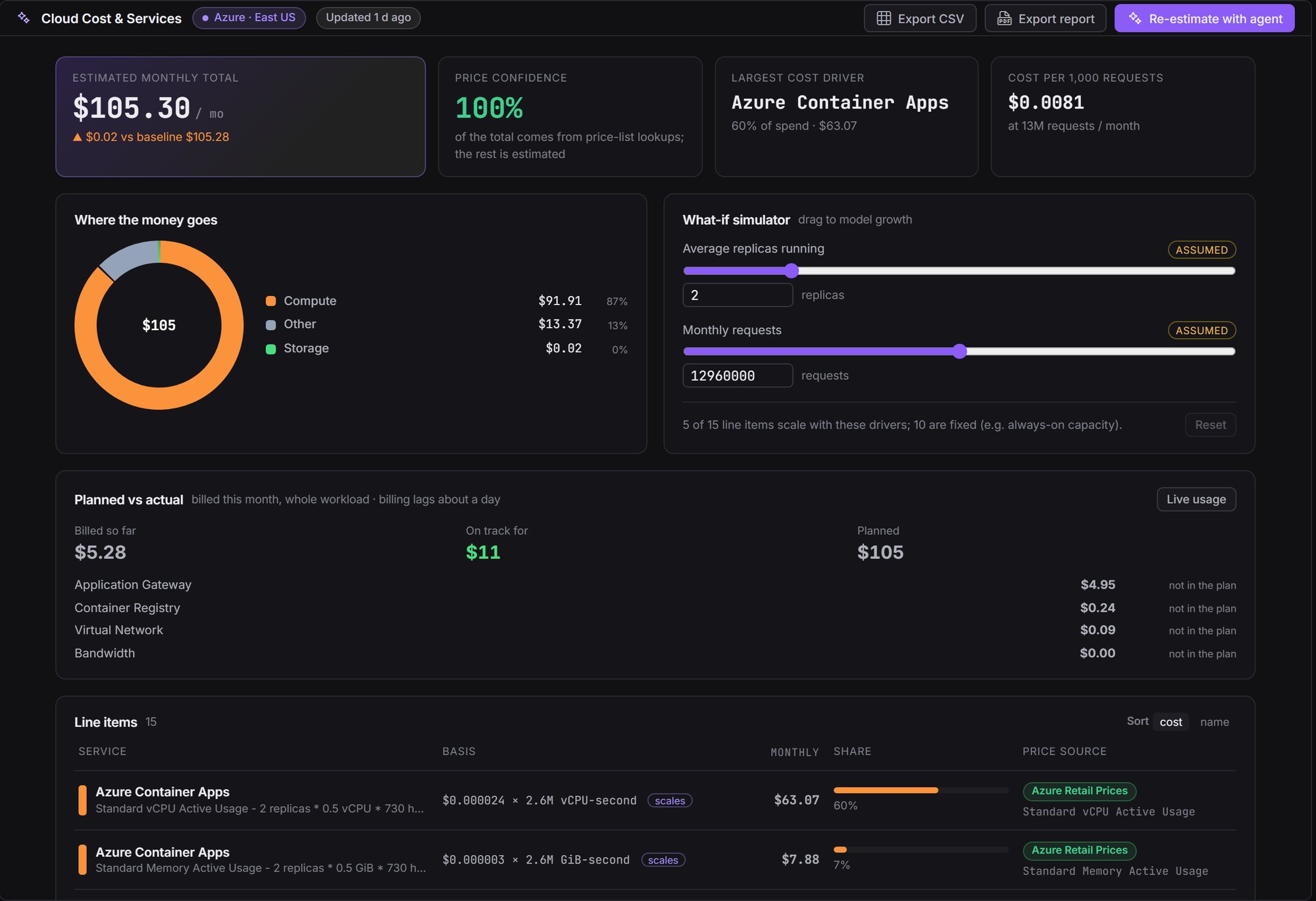
Each cost line shows the unit price, the quantity behind it and the exact price-list entry it came from. Drag the assumptions to see how the bill grows, and compare the plan with what the cloud actually billed.

Planned $105.30 a month, every line from Azure Retail Prices. Billed so far this month: $5.28.
Anneal cost page: cost split, what-if simulator, planned versus actual and line items

Deploy from your machine, one step at a time.

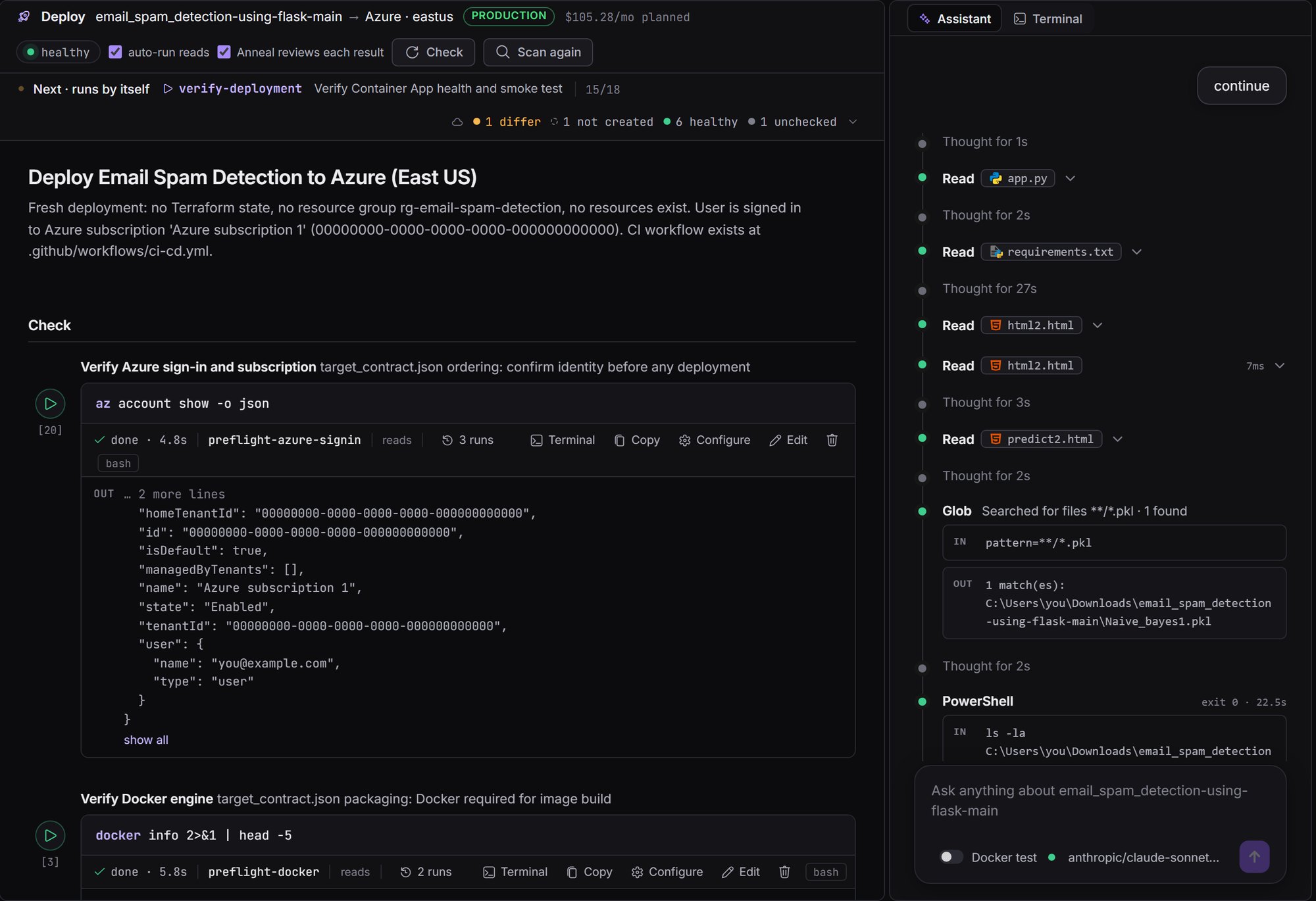
The deploy runbook lives in your own cloud account. Checks run by themselves, every change waits for you to press Run, and the assistant beside it reads each result and fixes a step that failed.

How deployment works →
Anneal deploy runbook: checks with their output and the assistant beside them
Always on

Deploying is where most tools stop. Anneal keeps going.

Your traffic changes, prices change, your team ships features. Anneal watches the live system and your code and keeps the architecture right — with you approving every change.

  1. 01WatchLive usage, spend and health from the cloud’s own monitoring.
  2. 02NoticeOversized, undersized, drifted, over budget — or new code.
  3. 03Re-planRe-measures, re-selects and re-prices only what changed.
  4. 04You approveAs a pull request, or a step you press Run on.

It watches the live deployment.

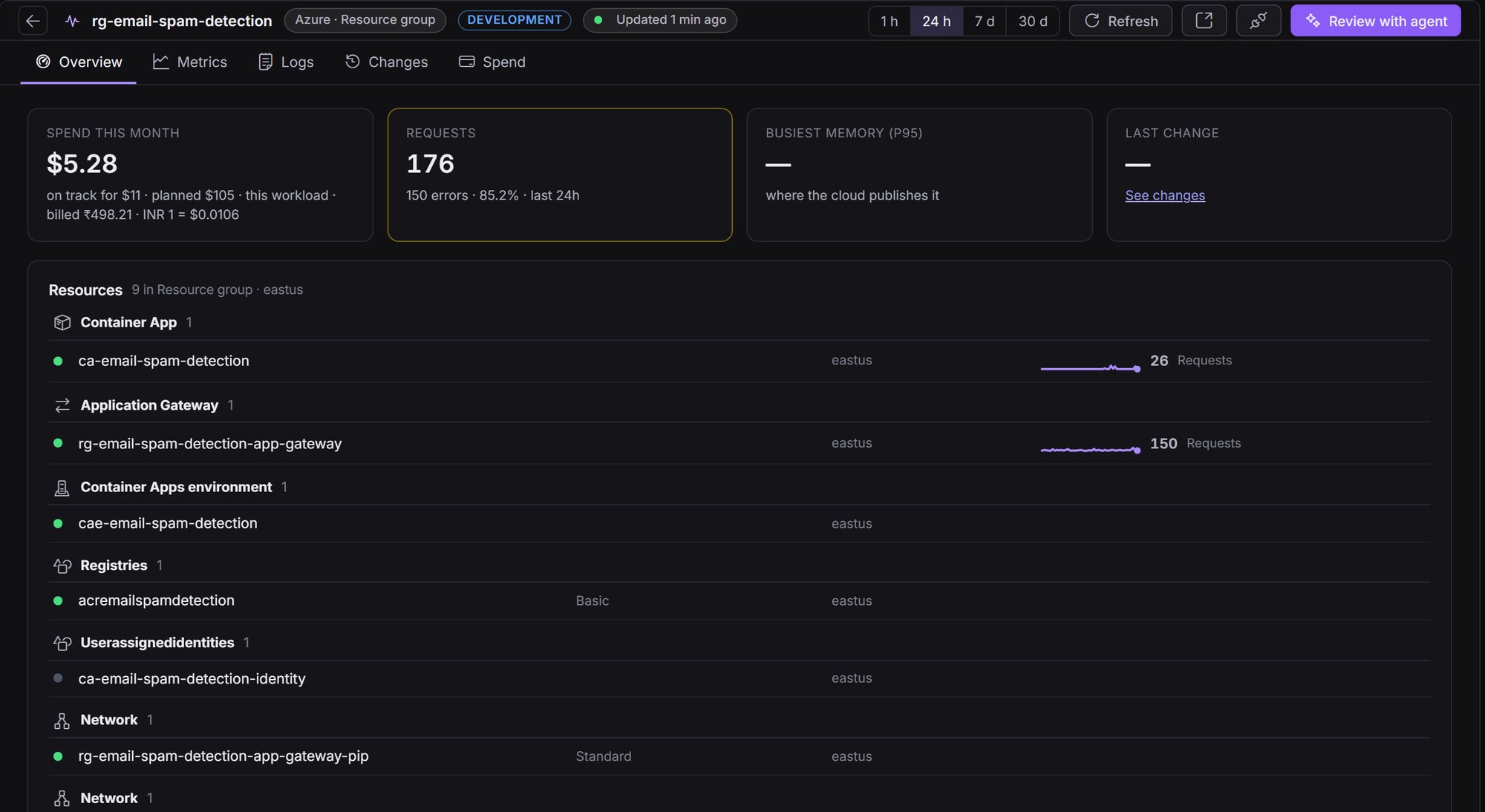
  • Planned versus actualCPU, memory, traffic, logs and spend from CloudWatch, Azure Monitor, Cloud Monitoring and OCI Monitoring, next to the plan.
  • Right-sizing with the savingWhich service is oversized or undersized, what to change it to, and what that saves each month.
  • Drift you can seeResources that differ from the plan, were never created, or appeared outside it.
  • Spend on trackBilled so far, on track for, and why it differs from the plan.
Anneal live usage: Azure resource group with spend, requests and resources

When your code changes, the architecture follows.

Anneal knows which files changed since each decision was made, and re-runs only the work they affect.

  • A feature is addedA new queue, database, file upload or background job is noticed — the right service is selected, sized and priced.
  • A feature is removedServices nothing uses any more are retired, and their cost comes off the bill.
  • Load or prices moveThe sizing is measured again and the services re-checked against today’s live prices.
  • Everything stays in stepDiagram, cost report, Terraform and policy checks are updated together — never one without the others.
How it works

A loop, not a one-off.

Each step leaves evidence you can open, so the next pass starts from what is already known — and only redoes what changed.

01

Learn your company

Reads your policies, governance documents, existing infrastructure and past architectures.

02

Read, test, measure

Reads the code, runs your tests and the real UI, and load-tests the route people actually use.

03

Choose and price

Picks services from the live catalog for what was measured, within your rules, priced line by line.

04

Draw and review

Draws the architecture, reviews it independently and writes Terraform that validates.

05

Deploy

From your machine in your account, one approved step at a time — or as a pull request for your CI.

06

Watch and adapt

Follows the live system and your code, and brings the next change back for you to approve. Then again.

Privacy

Your code stays on your machine.

Local first

Files, commands, tests and the conversation stay on your computer. The service that thinks for Anneal keeps nothing.

Secrets are masked

Keys and passwords are replaced before anything leaves your machine — <REDACTED_DB_URL> — and filled back in only where they're used.

You stay in control

Bring your own model key. Anneal never applies, pushes or deploys on its own: changes to your cloud wait for you.

Give your cloud an architect that never clocks off.

Open a project, ask one question, and get an architecture you can defend — today and after every release.